


 Cart
Cart "Pin this Proposal Kit Article")

The Records Management Toolkit (RMTK) is designed to accelerate planning and significantly reduce the time spent creating documentation for the development of a Records and Information Management Program.
The Records Management Toolkit uses a standard methodology of the six phases in the Records Management (RM) process to guide the professional when to use the RMTK templates throughout the complete program life cycle.
Developing a Records or Information Management Program is a process that can be planned before deciding on a RM software platform or used for improving business processes and making changes to existing Records Management Programs. The templates and sample documents in the Records Management Toolkit are the same phases that the larger corporations use but can be scaled to fit your business needs.
The Six Phases of an Information Management Program
The six phases include all the elements found in a Records or Information Management (RIM) Program. Each phase builds on the knowledge gained from previous phases and can be used to answer critical decision making questions about the direction and scope of your Enterprise Content Management (ECM) initiative.
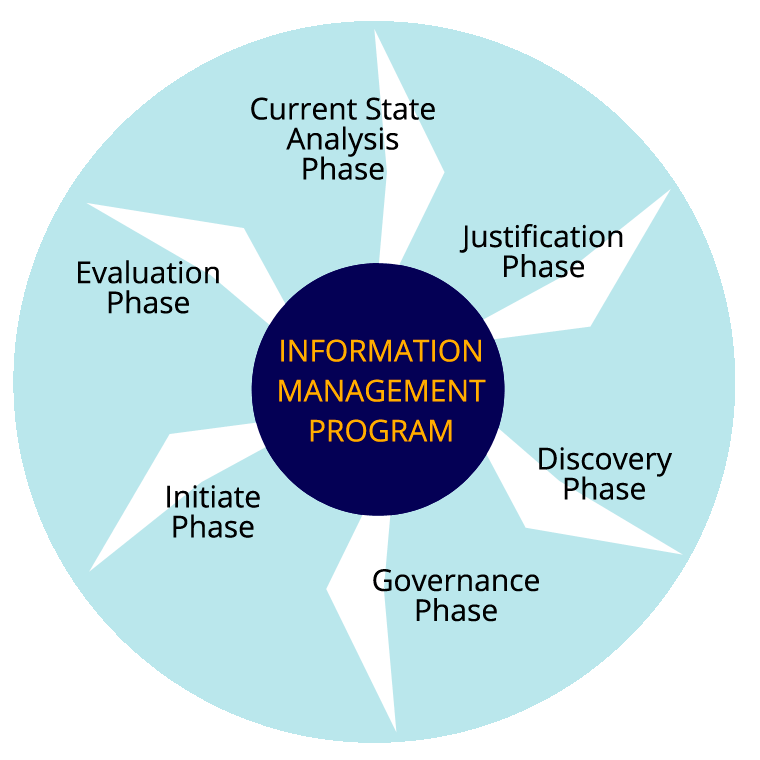
Figure 1: Phases of an Information Management Program
- Current State Analysis Phase - The review and identification of all existing policies and procedures and business processes that generate content. The Current State Analysis looks at where the organization is at with Records Management and identifies gaps in the current process. Use the Records Management Toolkit templates and sample documents to define the as-is state:
- Make the initiative known with the Records Management Topic Template to gain awareness and support from upper management for a RIM or ECM program.
- Use the Records Management Program Analysis Document to take a critical look at the current as-is state and define the goals of the RM Program. The analysis will shed light on the gaps in the current policies and procedures and draw attention to regulatory and compliance risks. The analysis may also be used to identify if the organization needs large scale Records Management software or a well-organized network file share. The analysis will define the benefits from an Information Management Program and the critical areas to start managing records and content.
- Justification Phase - The Business Case for moving forward and developing the records management program. Use the Business Case for Records Management and Records Management Return on Investment Calculator to scope the project, identify resources, and determine the return on investment. The Justification Phase can also help identify if the professional can “do it yourself“or hire external resources.
- Discovery Phase - Before developing or making changes to a file plan an inventory of documents should be performed for the identification and analysis of content throughout the enterprise. The inventory tells us what records are important and need to be managed as well as the volume and growth rate of content thought the organization.
- Use the Records Inventory Worksheet Questionnaire for Business Units and or Records Management Pre-Inventory Survey to help scope the program, identify content, stakeholders, and champions for the program. For some businesses the survey and questionnaire may provide enough information to start developing policies, procedures, and organizational changes for the management of content.
- For larger projects the professional should follow up with a detailed physical inventory using the Records Inventory Worksheet. The detailed inventory worksheet includes the use of metadata and common vocabulary for searching content, the identification of vital and non-vital records as well as the location of content and the potential for migration to a central repository. The Records Survey and Inventory Analysis document guides the professional to the next steps for developing an information management strategy for designing Content Management applications or file systems based on the inventory results.
- Governance Phase - Addresses how a Records Management Program will be managed. A governance plan identifies the operational tools to govern and the individuals or committees that make decisions and own the content. The Records Management Governance Plan lays the foundation and groundwork for users to comply with legal requirements and improved operations.
- Initiate Phase - Start building the framework for the Information Management Program by documenting and updating policies, procedures, and standardizing on taxonomy and metadata. Use the RM Program Analysis Document, Business Case for RM, Records Survey and Inventory Analysis, and RM Governance Plan to correct the gaps in the current process, update policies and procedures and RM software system design. Use the following forms and worksheets for rapid application development of departmental or enterprise information management software applications and provide the tools to allow users to act in accordance with the new program and provide guidance.
- Records Management Policies and Procedures - Defines the polices and functions of the Records Program. This document includes compliance and regulation plans for the organization.
- Records Access Security Plan - Identifies where security is needed, who needs access and who is responsible.
- Records Management Metadata Model - Documents the sources of metadata search criteria for content.
- Records Management Taxonomy Topic Template - Classification scheme for content.
- Records Management File Plan Template - Organizes documents and records using a controlled vocabulary or taxonomy for the management of content throughout the document’s life cycle.
- Records Management Expanded File Plan Template - Detailed File Plan for larger scoped Information Management Programs.
- Application for Records Retention Form - Policy and Procedure Form for adding records to be managed as part of the program.
- Authorization for Records Destruction Form - Policy and Procedure Form for authorizing destruction of records.
- Formal Record Hold Investigation Form - Policy and Procedure Form for requesting content for a legal hold.
- Formal Record Hold Notice Form - Policy and Procedure Form notifying users of a legal hold.
- Release of Legal Hold Notice Form - Policy and Procedure Form notifying users of the release of the legal hold.
- Record Retention Schedule Change Form - Policy and Procedure Form notifying users of a change in retention schedules.
- Legal Hold and Discovery Log - Policy and Procedure log for tracking legal holds.
- Records Disposition Log - Policy and Procedure log for tracking destroyed records.
- Physical Content Management Box Label - Policy and Procedure Form for tracking physical records.
- Evaluation Phase - the Information Management Program is not a static part of business. The program will evolve and change with business requirements and technology and should be revised and reviewed on a regular basis. The Information Management Program will need to be maintained and the Records Management Governance Plan should include a schedule to periodically review the program documents to make sure they are still relevant and in compliance.


 Facebook
 YouTube
 X
X Search Site