

 Cart
Cart
Physical Content Management Box Label
 Get 20% off ordering today: Click here for the code
Proposal Kit Professional adds business proposals, all six Contract Packs,
Project Management Pack library, and Expert Edition software.
We include this editable document in the Proposal Kit Professional. Order and download it for $199. Follow these steps to get started.
 DOWNLOADABLE, ONE-TIME COST, NO SUBSCRIPTION FEES
Key Takeaways
- One-time License, No Subscriptions: Pay once and use Proposal Kit forever-no monthly fees or per-use charges.
- Built for Business Projects: Start with a proven Physical Content Management Box Label and tailor sections, fields, and branding for your day-to-day project work.
- Instant Access: Download immediately and open the document right away-no waiting, no onboarding delay.
- Project-Ready Structure: Use a ready, professional layout for real-world project tasks (checklists, forms, analysis pages) so teams can execute consistently.
- Fully Editable in Word: Edit everything in Microsoft Word-swap text, add/remove sections, and apply your logo/colors without special skills.
- Step-by-Step Wizard Help: The Proposal Pack Wizard guides you with training/help and keeps you moving-no getting stuck on formatting or assembly steps.
- Wizard Data Merge & Project Management: Let the Wizard manage projects and merge recurring data (company/client names, addresses, dates) across your project documents.
- Included in Proposal Kit Professional: Available exclusively in the Proposal Kit Professional bundle.
 What Our Clients Say
Detailed, comprehensive & highly usable system of documentation to run and grow my whole business. I needed a full suite of documents to manage, run and grow my business. Proposal Kit provided highly insightful industry-specific materials to make my proposals amazing, customized and comprehensive, legal contracts with clients, contractors and employees and even a whole bunch of supporting documents to help manage and administer the business. I truly couldn’t believe my luck when I found this. Have just upgraded to the latest version and it is even more awesome than before."
Cyrius Media Group Pty Ltd
1. Get Proposal Kit Professional that includes this business document.
We include this Physical Content Management Box Label in an editable format that you can customize for your needs.
2. Download and install after ordering.
Once you have ordered and downloaded your Proposal Kit Professional, you will have all the content you need to get started with your project management.
3. Customize the project template with your information.
You can customize the project document as much as you need. You can also use the included Wizard software to automate name/address data merging.
Use cases for this document
Elena Park streamlines NorthRiver Components' paper trail during a surprise compliance review
The Challenge
When a customer audit uncovered inconsistent box markings and missing destroy dates across the AP and QA archives, Records Manager Elena Park faced crowded aisles of record center cartons with mixed contents, no clear record series title, and little linkage to the company's file plan or term store, all threatening the document lifecycle and disposition management timeline.
The Solution
Elena implemented the Physical Records Box Label Form with pre-printed retention labels, Unique IDs as an asset id, and a strict status final policy before shelving; she aligned label fields to a SharePoint taxonomy via the content type hub and mapped a fiscal year label to the records series, while using Proposal Kit's document creation tools to produce a business case, AI Writer to draft training guides and a disposition schedule overview, RFP Analyzer to turn the auditor's checklist into a gap analysis report, and line-item quoting to price label stock, barcode scanners, and shelving.
The Implementation
IT configured managed properties for complianceassetid and department fields to support search and a box labels report, operations adopted print preview and box label CSV workflows, and Elena's team published labeling guidelines by creating department and record series titles using Proposal Kit's templates so supervisors could enforce auto-apply label policy rules consistently.
The Outcome
Within a quarter, the audit trail improved, destruction dates were scheduled with fewer exceptions, retrieval time dropped from days to hours, and the follow-up audit closed with no findings while finance approved the budget based on the Proposal Kit's line-item quoted savings.
Dr. Miguel Santos unifies hybrid records for PrairieCare Network ahead of an insurer audit.
The Challenge
PrairieCare's clinics had paper HR and patient accounting boxes scattered across storage locations, while digital copies lived in a document library with Microsoft Purview label policies, leaving gaps between physical retention duration and event-based retention triggers.
The Solution
Santos adopted the box label form to capture imaged status, creating department, and transfer dates, synchronized the labels with a Purview record label and compliance tag scheme, and used Proposal Kit to produce a policy update packet, AI Writer to draft a change management plan and a retention holds playbook, RFP Analyzer to structure the insurer's audit request into a response outline, and line-item quoting to compare imaging vendor options.
The Implementation
The team mapped crawled properties to refinablestring00/01 for department and date span, standardized a record series title list through the term store, and rolled out dashboards fed by CSV and HTML reports to spotlight pending disposition management and exceptions across sites.
The Outcome
Clinics passed the insurer audit, avoided penalties, achieved consistent retention scheduling across paper and digital content, and reduced offsite storage spend with clear, defensible destruction backed by Proposal Kit-authored process documentation.
City Clerk Aisha Monroe rescues Larkspur's permit archives while winning funding
The Challenge
Decades of building permits filled aging storage cartons with vague descriptions and no uniform retention policy, stalling public records responses and risking missed retention periods as a new records center lease loomed.
The Solution
Monroe rolled out standardized pre-printed labels with Unique IDs, status final checkpoints, and destruction dates, then used Proposal Kit to create a council briefing and grant proposal, applied AI Writer to craft a cost-benefit study and stakeholder communication plan, leveraged RFP Analyzer to align state retention requirements with the city's disposition schedule, and used line-item quoting to detail costs for cartons, labels, and imaging prep.
The Implementation
Her team boxed and labeled by neighborhood and year, implemented check-in check-out procedures for cartons, configured storage location reports and box labels report exports, and aligned record series titles in the content type hub so future digital imaging could mirror the physical file plan.
The Outcome
The council approved funding, retrieval time for permit requests dropped dramatically, the city demonstrated robust reporting and a clear audit trail to the state, and a phased destruction and transfer calendar reclaimed space without disrupting services.
Abstract
This archiving form establishes a simple, enforceable framework for physical records management. It requires pre-printed retention labels on storage cartons and prohibits handwriting with a permanent marker, reducing ambiguity and misfiling. Each box must be full and include only documents required by law for a defined retention period.
The form captures core metadata in a database or information management system, including a Unique ID (serving as an asset ID), fiscal period and fiscal year, department name, destroy date, whether content has imaging completed, accessibility in the system, the content storage application, and a concise archival description of contents such as invoices or HR records. These labeling guidelines support accurate document classification, clear date span identification, and consistent boxing and labeling across creating departments.
The fields map neatly to a file plan and records series, enabling retention and disposition control. Organizations can align the destruction date with the disposition schedule, including event-based retention when applicable (for example, an event type like project closure) and document the retention duration, retention action, and any retention holds. In hybrid environments, this metadata can align with SharePoint, Microsoft Purview label policies, and the managed metadata service, using a compliance tag or record label tied to a retention policy. Teams often map fields to managed properties and crawled properties in the search schema (for example, refinablestring00, refinablestring01, or a complianceassetid) to support auto-apply label policy rules with keyql-like queries and auto-delete actions once content reaches destruction dates or transfer dates.
Operationally, barcoded labels and scanners improve record circulation tracking, visual space management, and audit trail log creation for record center cartons. A reports module can generate a box labels report, storage location report, CSV report, HTML report, and box label CSV for dashboards and robust reporting. Organizations that manage jobs in batches may route print preview tasks or exports through a queue (for example, Gearman).
Security control, check-in and check-out procedures, document-level tracking, and user profiles round out governance and space management. Use cases include finance storage cartons for AP invoices by fiscal year, HR personnel files with defined retention scheduling, and production document archives under advanced record series management and document library settings.
Proposal Kit can help teams assemble this form and related procedures quickly. Its template library and document assembly streamline label design, policy write-ups, and product specification content. The AI Writer can write supporting documents, and automated line-item quoting helps build budget proposals for labels, barcode scanners, and imaging services, all with a focus on ease of use.
Beyond labeling and metadata capture, organizations can use this form to anchor the entire document lifecycle for physical records. When a box is sealed and verified, teams can set its status final, signaling no further additions and triggering disposition management milestones such as review, transfer, or destruction. Capturing the creating department and a clear record series title on the label aligns each carton to the file plan and enables more precise reporting on workloads, storage demand, and compliance activity.
Taxonomy discipline accelerates downstream processes. Many teams mirror the terms on this label with an enterprise term store and publish standardized content types via a content type hub so the same fields and values appear across systems. That approach keeps naming consistent between physical cartons and digital repositories, helping staff resolve discrepancies and maintain continuity if boxes are imaged later or cross-referenced in a document library.
Finance and facilities teams often extend the label data to operational controls. Chargeback tracking can allocate storage and handling costs back to departments based on the number of boxes, date span, and retention duration. Clear ownership by the creating department supports accountability for approvals at each stage and improves audit readiness when reviewers validate destruction eligibility against the disposition schedule.
Proposal Kit helps teams operationalize these practices in business documentation. Use its template library and document assembly to produce labeling procedures, training guides, and policy summaries that reflect your term store and record series title conventions. The AI Writer can write supporting process narratives for status final transitions and disposition management, while automated line-item quoting helps estimate costs for storage, imaging, and handling in proposals. Its ease of use allows stakeholders to assemble consistent, professional materials quickly.
A mature program extends this form into operational controls that reduce risk and cost. Before sealing a carton, teams can run a quality check using print preview to confirm fields are complete and consistent, then produce a product specification for label stock and barcode placement to ensure reliable scans in dim warehouses and during imaging prep. When boxes move to restricted storage, check-in check-out processes linked to user profiles create a clear chain of custody, while security control, such as dual authorization for removals, protects sensitive content. Dashboards fed by CSV report and HTML report outputs provide robust reporting on destruction dates due this quarter, upcoming transfer dates, and retention period exceptions, helping managers prioritize work and avoid last-minute rushes.
The Imaged (Yes/No) and Are records accessible fields can guide hybrid decisions. If digital copies exist in a document library, teams can align physical holdings with matching record label rules and label policies in Microsoft Purview for consistency, without conflating systems. Crawled properties and managed properties mappings, along with a compliance tag or complianceassetid, keep identifiers aligned so audit teams can reconcile cartons with digital references during reviews. For capacity planning, storage location report data supports space management and visual space management by highlighting underused aisles, and record circulation tracking shows which record center cartons require replenishment or consolidation.
Exception handling benefits from clear triggers. Retention holds may pause a scheduled destruction even after status final; dashboards can flag those holds while disposition schedule timers continue for unaffected boxes. Auto-delete actions should never run on held records, but auto-apply rules can still route non-held items into timely workflows. During seasonal peaks, managing job queues can batch box label CSV exports and box labels report runs so staff can print, apply, and stage storage cartons efficiently.
Proposal Kit can help capture these practices as clear SOPs, training guides, and policy summaries. Use its document assembly and template library to document exception handling, dashboard KPIs, and product specification details, while the AI Writer drafts supporting procedures and the automated line-item quoting streamlines budget proposals for labeling, scanners, and storage improvements.
Writing the Physical Content Management Box Label document
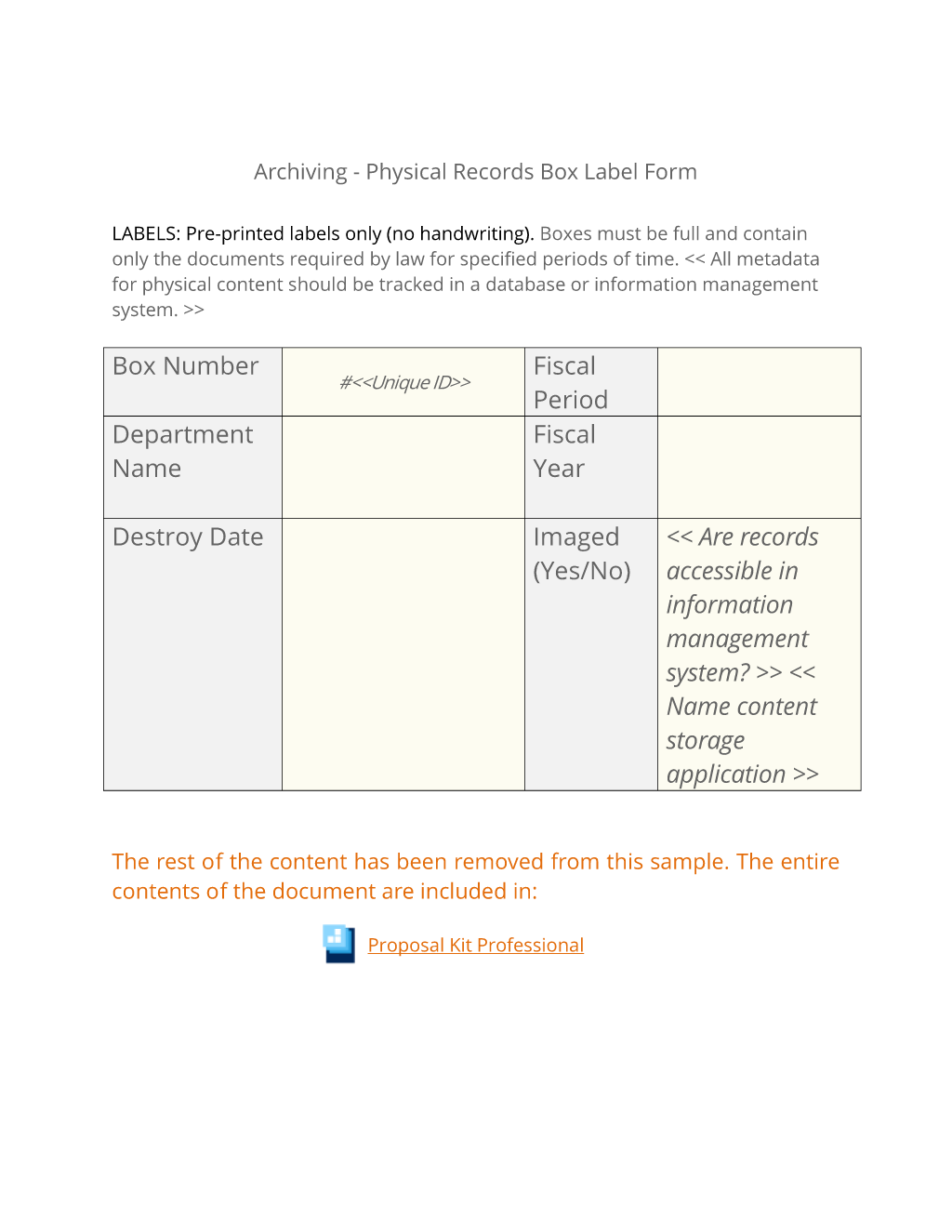
Archiving - Physical Records Box Label Form
LABELS: Pre-printed labels only (no handwriting). Boxes must be full and contain only the documents required by law for specified periods of time. All metadata for physical content should be tracked in a database or information management system.
#Unique ID Fiscal Period Department Name. Fiscal Year Destroy Date Imaged (Yes/No) Are records accessible in information management system? Name content storage application. Description of Contents. General description of content such as invoices, HR Records, etc.
The editable Physical Content Management Box Label document - complete with the actual formatting and layout is available in the retail Proposal Kit Professional.
20% Off Discount
 4.7 stars, based on 850 reviews
Related Documents
- Records Inventory Worksheet Questionnaire for Business Units
- Records Management Pre-Inventory Survey
- Records Survey and Inventory Analysis
- Business Case for Records Management
- Records Management Program Analysis Document
- Records Management Policies and Procedures
- Records Access Security Plan
- Records Management File Plan Template
- Records Management Expanded File Plan Template
- Records Access Security Plan (Expanded)
- Communication Plan
- RACI Matrix Worksheet
- User Acceptance Testing (UAT) Schedule
- User Acceptance Testing (UAT) Enhancements and Bug Tracker
- Risk Mitigation Plan
 Published by Proposal Kit, Inc.
We include a library of documents you can use based on your needs. All projects are different and have different needs and goals. Pick the documents from our collection, such as the Physical Content Management Box Label, and use them as needed for your project.
 Facebook
 YouTube
 Bluesky
 Search Site
© 1997 - 2026, Proposal Kit, Inc. All rights reserved. Privacy Policy